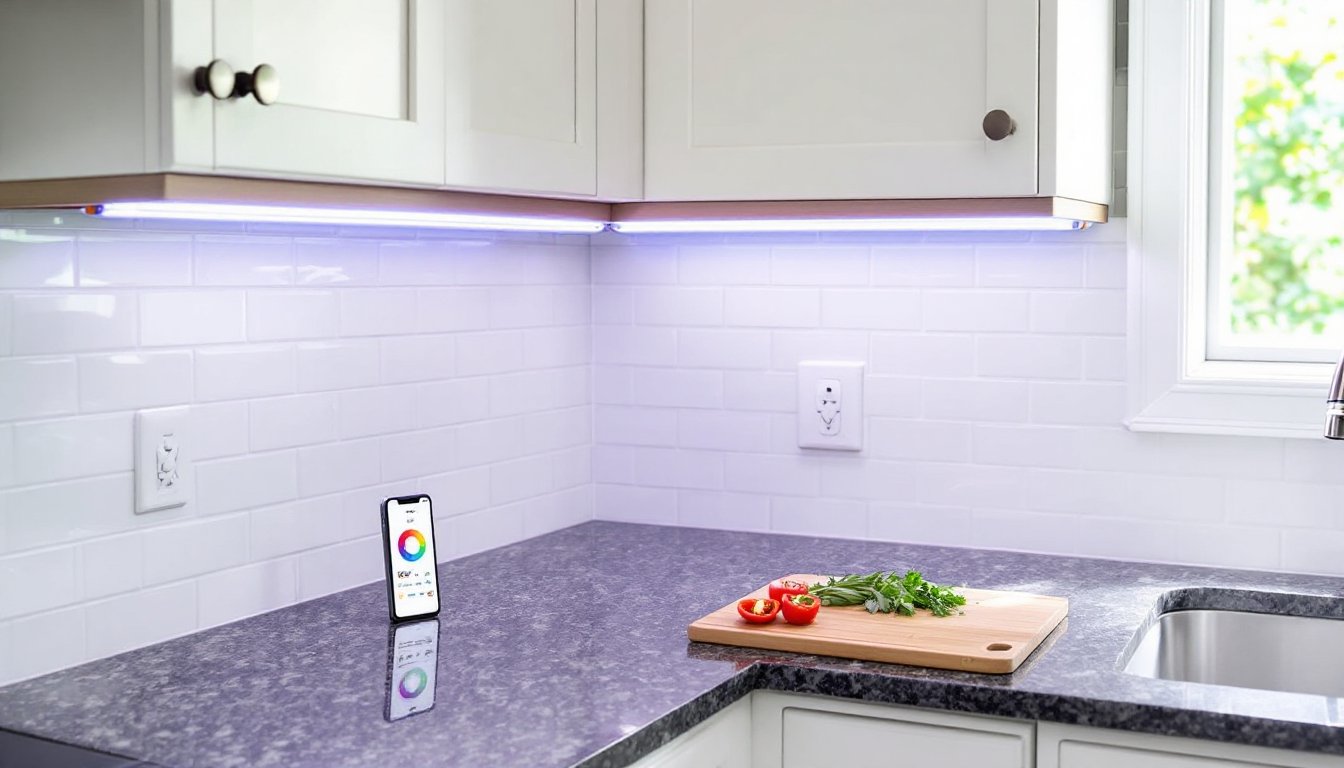
Under cabinet lighting isn’t just about aesthetics, it’s functional task lighting that makes kitchen work safer and more efficient. GE Cync brings smart home integration to this essential lighting category, offering color-changing LED strips that respond to voice commands, schedules, and app control. These fixtures bridge the gap between professional-grade illumination and user-friendly installation, making them accessible to DIYers who want modern lighting without rewiring their entire kitchen. Whether upgrading dated fluorescent tubes or adding light to a previously dim workspace, Cync strips deliver adjustable brightness and color temperature that adapts throughout the day.
Table of Contents
ToggleKey Takeaways
- GE Cync under cabinet lighting offers smart color-changing LED strips that integrate with Google Assistant and Alexa without requiring a separate hub, making them ideal for DIY kitchen upgrades.
- The system is available in linkable 12-inch, 18-inch, and 24-inch strips with RGB and tunable white LEDs that range from 2700K warm to 6500K daylight, supporting both task lighting and ambient customization.
- Plug-in installations are fast and renter-friendly, while hardwired options provide a permanent solution for kitchen remodels—plug-in versions typically cost $30–$50 per strip.
- GE Cync strips deliver approximately 400 lumens per foot with a 50,000-hour lifespan (roughly 17 years of use) and support scheduling, dynamic color effects, and multi-room grouping through the mobile app.
- The system works exclusively on 2.4 GHz Wi-Fi networks and requires an additional Smart Hub accessory for Apple HomeKit compatibility, which may add unexpected costs for iOS-focused households.
- Homeowners should skip this system if they lack adequate Wi-Fi coverage in the kitchen, need outdoor-rated fixtures, or require the highest color accuracy, but it’s an excellent choice for most DIYers wanting functional smart under-cabinet lighting.
What Is GE Cync Under Cabinet Lighting?
GE Cync under cabinet lighting consists of LED light strips designed specifically for installation beneath wall cabinets, primarily in kitchens but adaptable to offices, workshops, and display shelving. The system operates on GE’s Cync smart platform, which integrates with Bluetooth and Wi-Fi connectivity for app-based and voice control.
These fixtures come in linkable strips, typically 12-inch, 18-inch, and 24-inch lengths, that connect end-to-end to span longer cabinet runs. Each strip houses RGB+tunable white LEDs, allowing users to switch between task lighting (bright white for food prep) and ambient lighting (warm tones or full-color options for entertaining).
Unlike basic plug-in puck lights or hardwired fluorescent fixtures, Cync strips offer dynamic control over both brightness (dimmable from 1% to 100%) and color temperature (ranging from 2700K warm white to 6500K daylight). The system doesn’t require a separate hub: lights connect directly to a home’s Wi-Fi network during setup, simplifying the installation compared to hub-dependent platforms like Philips Hue.
The strips are ETL-listed and meet UL safety standards for direct-wire or plug-in residential use. They’re rated for 50,000 hours of operation, which translates to roughly 17 years at 8 hours daily use.
Key Features and Smart Capabilities
The defining characteristic of Cync under cabinet lighting is its full-spectrum color capability combined with tunable white light. Users can select from 16 million colors via the app or stick to whites ranging from candlelight warmth to clinical daylight, useful for tasks requiring accurate color rendering, like checking produce freshness or matching paint samples.
Voice control works natively with Google Assistant and Amazon Alexa. Commands like “dim the kitchen lights to 30%” or “set under cabinet lights to warm white” execute without additional hubs. Apple HomeKit compatibility requires the Cync Smart Hub accessory (sold separately), which some users find frustrating given the otherwise hub-free design.
Scheduling and automation run through the Cync app (iOS and Android). Homeowners can program lights to turn on at sunset, fade up gradually in the morning, or sync with other Cync devices throughout the home. The app also offers preset scenes, “Energize,” “Relax,” “Cooking”, that adjust brightness and color temperature to match activities.
One standout feature: dynamic color effects. The strips can cycle through colors, pulse to music (via the app’s audio analysis), or run holiday-themed animations. While not everyone needs rainbow underlighting in their kitchen, it’s there for those who want it during parties or seasonal decor.
Each strip outputs approximately 400 lumens per foot, which provides ample task lighting for standard 24-inch-deep countertops. For comparison, that’s roughly equivalent to a 40-watt incandescent bulb per linear foot, plenty for chopping vegetables but not blindingly bright when dimmed for evening ambiance.
The system supports grouping. If you install strips in both the kitchen and a wet bar, you can control them independently or together. Multi-room control works seamlessly as long as all fixtures stay within Wi-Fi range.
Installation Guide for DIY Success
Before opening the box, measure the cabinet run and verify you’ve ordered enough strips to cover the span. GE sells linking cables in 6-inch and 12-inch lengths to bridge gaps like the space over a sink or range.
Tools needed:
- Drill with 1/4-inch bit (for hardwired installations)
- Wire strippers
- Phillips screwdriver
- Wire nuts (if hardwiring)
- Level
- Pencil
- Safety glasses
Materials:
- Cync under cabinet light strips (quantity as needed)
- Linking cables (if spanning multiple cabinets)
- Mounting screws (included with strips)
- 14/2 NM-B Romex cable (hardwired installations only)
Step-by-step for plug-in installation:
- Clean the mounting surface. Wipe cabinet undersides with isopropyl alcohol to remove grease and dust. Adhesive backing works, but screws provide more permanent attachment.
- Mark mounting locations. Position strips 2–3 inches from the front edge of the cabinet to minimize glare on polished countertops. Use a level to keep runs straight.
- Attach the first strip. Secure with the included screws (typically two per 12-inch strip). Drive screws into solid cabinet material, not veneer that can delaminate.
- Connect additional strips. Use linking cables to join strips end-to-end. Plugs are keyed and only fit one way, don’t force them.
- Route the power cable. Run the cord along the cabinet’s back edge toward the nearest outlet. Use cable clips (not included) to keep wiring tidy. Avoid routing across a cooktop or where it could contact a hot surface.
- Plug in and test. Verify each strip illuminates before proceeding to app setup.
Hardwired vs. Plug-In Options
GE Cync offers both plug-in and direct-wire kits. Plug-in installations are faster and don’t require an electrician, but they leave a visible power cord that must reach an outlet. If there’s no receptacle under the cabinet, you’ll need to add one or run an extension cord (which creates a tripping hazard and may not meet code for permanent installations).
Hardwired installations involve connecting the light strip directly to your home’s electrical system, typically by tapping into the circuit that powers the kitchen lighting. This requires working inside a junction box and splicing 120V wiring, a task that demands comfort with electrical work or a licensed electrician.
Code considerations: Many jurisdictions require hardwired under-cabinet lights to be on a switched circuit (not continuous power) and to use a listed junction box. If you’re hardwiring, verify local electrical code and consider whether you need a permit. Hardwiring also voids the plug-and-play simplicity that makes Cync attractive to DIYers, so weigh that trade-off.
For hardwiring:
- Shut off power at the breaker and verify with a non-contact voltage tester.
- Install a junction box in the cabinet if one isn’t present.
- Run 14/2 Romex from the switch or power source to the junction box.
- Strip the light’s power cable and splice to the Romex using wire nuts: black to black (hot), white to white (neutral), green or bare to ground.
- Secure all connections in the box and restore power to test.
Professional help recommended if you’re unfamiliar with residential wiring or uncomfortable working in a live panel. Mistakes can cause fires or electric shock.
Setting Up the Cync App and Voice Control
Once the lights are physically installed and powered, the Cync app handles configuration. Download it from the App Store or Google Play and create a free account.
Initial pairing:
- Open the app and tap the “+” icon to add a new device.
- Select “Lights” and then “Under Cabinet.”
- The app prompts you to turn the light on. Cync strips enter pairing mode automatically on first power-up, indicated by a slow pulsing.
- The app searches for nearby Bluetooth devices. When your strip appears, tap to connect.
- Follow prompts to connect the light to your 2.4 GHz Wi-Fi network (Cync doesn’t support 5 GHz). Enter your network password when prompted.
- Once connected, name the light (e.g., “Kitchen Counter”) and assign it to a room.
Linking to voice assistants:
For Google Assistant, open the Google Home app, tap “+,” then “Set up device,” then “Works with Google.” Search for “Cync” and sign in with your Cync account credentials. Your lights will appear in the Google Home interface.
For Alexa, open the Alexa app, tap “Devices,” then “+,” then “Add Device.” Select “Light,” then “GE.” Sign in to your Cync account when prompted. Alexa will discover all Cync devices.
Troubleshooting tips: If lights won’t pair, confirm the Wi-Fi network is 2.4 GHz and the router isn’t set to AP isolation mode (common in guest networks). Power-cycle the strip by unplugging it for 10 seconds. If Bluetooth pairing times out, move your phone within 3 feet of the strip. Some users report connectivity improvements after updating the strip’s firmware through the app, so check for updates immediately after pairing.
Design Ideas and Practical Applications
Under cabinet lighting serves two primary roles: task illumination and accent lighting. Cync’s adjustable color temperature makes it effective for both.
For task lighting, set strips to 4000K–5000K (neutral to cool white) and 80–100% brightness during food prep. This mimics natural daylight, reducing eye strain and improving visibility when working with knives or reading recipes. Position strips toward the front third of the cabinet to cast light onto the work surface without creating shadows from your body.
In open shelving or glass-front cabinets, Cync strips highlight dishware and decor. Install them along the underside of shelves or inside the top of the cabinet frame to backlight glassware. Use warm white (2700K) at lower brightness to create depth without harsh glare.
Wet bars and coffee stations benefit from the color-changing feature. Program the lights to shift to amber or red during evening hours to maintain a relaxed atmosphere, then switch to bright white for morning coffee prep.
For workshops or garage counters, the plug-in option installs quickly, and the full-brightness setting provides clear visibility for detailed work. The color accuracy (CRI not specified by GE but typical for modern RGB LEDs is 80+) is adequate for most hobbyist tasks, though professionals matching paint or stain might prefer dedicated high-CRI fixtures.
Rental-friendly installations are possible with the plug-in version. Adhesive mounting works on smooth cabinet surfaces, and the system removes without damage (though some residue may remain). The ability to take the lights when moving makes this a practical upgrade for renters who want smart features without permanent changes.
Design tip: Avoid installing strips where they’ll reflect in glossy backsplashes or create hotspots in polished granite. A diffuser lens (not included but available aftermarket) softens the LED point sources and provides more even light distribution. Some DIYers mount strips inside a shallow aluminum channel for a cleaner look and better heat dissipation.
Pros, Cons, and Who Should Buy
Pros:
- No hub required for Google and Alexa integration (unless you need HomeKit)
- Tunable white and full RGB provide flexibility between task and mood lighting
- Linkable design scales to fit any cabinet length
- Simple plug-in installation accessible to most DIYers
- Long lifespan (50,000 hours) with energy-efficient LED technology
- Competitive pricing compared to other smart under-cabinet systems
Cons:
- Requires Apple HomeKit hub for iOS users invested in that ecosystem, adding cost
- 2.4 GHz Wi-Fi only, which can be congested in dense neighborhoods
- No integrated diffuser, so individual LEDs are visible in reflective surfaces unless you add aftermarket covers
- Hardwired option requires electrical knowledge or professional installation
- Firmware updates occasionally required for full functionality, which some users find annoying
- In independent testing, brightness consistency across linked strips can vary slightly when running dynamic color effects
Who should buy:
Homeowners with existing Google or Alexa smart home ecosystems looking to add functional kitchen lighting without the expense and complexity of a full smart lighting overhaul. The plug-in version suits renters or DIYers uncomfortable with electrical work, while the hardwired option appeals to those doing kitchen remodels who want permanent, wire-free installations.
The color-changing feature justifies the cost over basic LED strips for households that entertain frequently or enjoy customizing ambiance. If you need only static task lighting with no smart features, traditional dimmable LED strips cost less and deliver equivalent lumens.
Skip this system if you’re deeply invested in Apple HomeKit and don’t want to buy an additional hub, or if your Wi-Fi coverage is weak in the kitchen. Also consider alternatives if you need outdoor-rated fixtures (Cync under-cabinet lights are indoor-only) or if you prioritize the highest color accuracy (high-CRI dedicated task lighting outperforms RGB strips).
For most DIYers seeking a balance of functionality, ease of installation, and smart features, GE Cync under-cabinet lights deliver solid performance at a reasonable price point, typically $30–$50 per strip depending on length and retailer. Budget for linking cables (around $10 each) and plan your layout before ordering to avoid surprise costs.